static
Integrating with your page
Your Authava bot can integrate with your page in many ways.
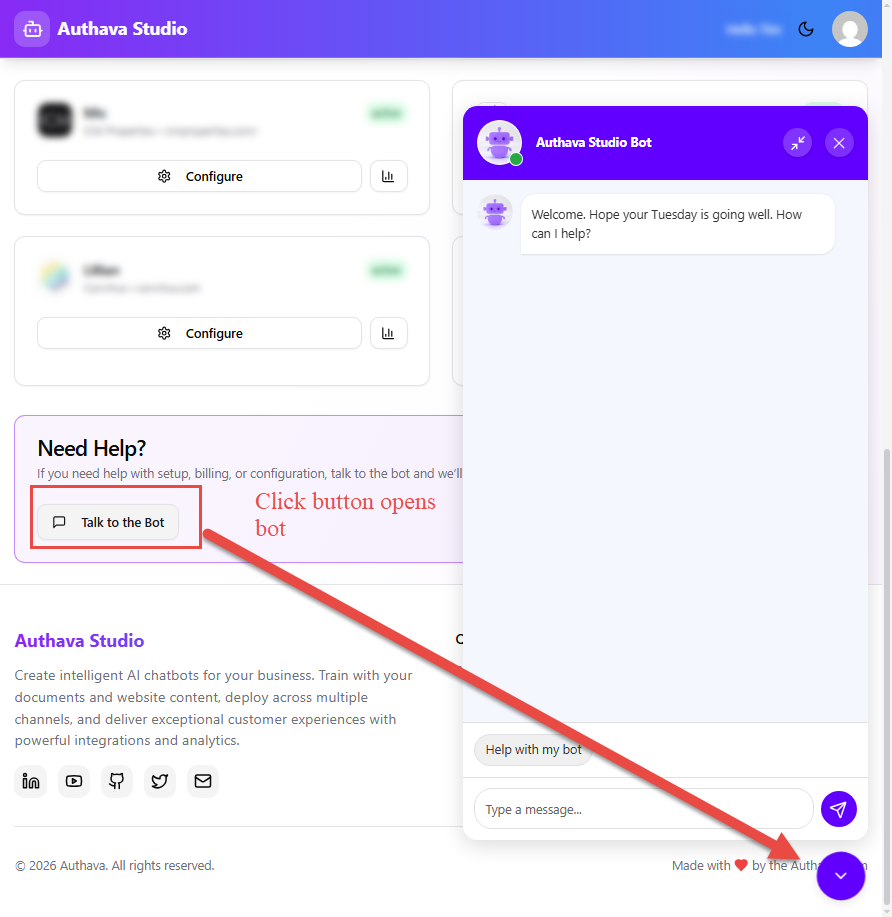
Have a button open your bot
You can have a button or link on your host page open the bot.
<!-- Copy this embed link from the overview page of your tenant.-->
<script defer src=[YOUR SOURCE] data-id=[YOUR TENANT ID]></script>
<!-- use this button to open the chat bot -->
<button id="openBotBtn">
  Open Chatbot
</button>
<script>
  // bot API stored here once it's ready
  let chatbotApi = null;
  window.addEventListener("AuthavaChatbotReady", (event) => {
    const { tenantId } = event.detail;
    chatbotApi = window[`AuthavaChatbot_${tenantId}`];
    if (chatbotApi) {
      console.log("Chatbot is ready:", tenantId);
    } else {
      console.warn("Chatbot API not found for tenant:", tenantId);
    }
  });
  // wire up the button
  document.addEventListener("DOMContentLoaded", () => {
    const btn = document.getElementById("openBotBtn");
    btn.addEventListener("click", () => {
      if (chatbotApi) {
        chatbotApi.open();
      } else {
        console.warn("Chatbot not ready yet.");
      }
    });
  });
</script>
Studio does this